The most direct and easiest way to solution this issue is to have an excellent Touch Screen Protector Film. HYT parts offers multiple options for your cell phone. It provides multiple solutions for you to arm your cell phone to the teeth. Please feel free to find what your looking for here at HYT parts.
You can easily fix your broken cell phone and even make it a better one.
Showing posts with label iphone accessories. Show all posts
Saturday, 4 January 2014
Start to Protect Your Phone from Its “Face”
Many friends of mine complain of the scratches or abrasion of the touch screen of their phone. You can imagine how embarrassing it is if your touch screen is fully covered with scratches. Sometimes, the minute detail will show the taste yourself. So, it is necessary for you to protect your cell phone from its “Face”.
The most direct and easiest way to solution this issue is to have an excellent Touch Screen Protector Film. HYT parts offers multiple options for your cell phone. It provides multiple solutions for you to arm your cell phone to the teeth. Please feel free to find what your looking for here at HYT parts.
Sunday, 8 September 2013
12 Steps To Replace iPhone 4 Earpiece Speaker -Replace a blown-out earpiece speaker in your iPhone 4
Step 1
First, we need to prepare the repair tool kit and
earpiece replacement part
Before disassembling your iPhone 4, be sure it is
powered off
And then use a SIM card eject tool to eject the SIM card and
its holder.
Remove the SIM card and its holder from the iPhone
Step 2
Remove the two 3.6 mm Pentalobe or Phillips #000
screws next to the dock connector.
Your iPhone 4 rear cover may have either two #000
Phillips screws or Apple's 5-Point "Pentalobe" screws. Check which
screws you have, and ensure you also have the correct screwdriver in order to
remove them.
As you can see, the iPhone 4 that we used here is
with two 3.6 mm Pentalobe screws,so we use the Pentalobe screwdriver here
(Our Repair Tools provides the tools and screws
needed to replace the Pentalobe screws with Phillips screws.)
Step 3
Push
the rear panel toward the top edge of the iPhone
Pinch the rear panel with your fingers and
lift it away from the iPhone. Or you can use a Suction Cup in case of damage
the plastic clip that attached to the rear panel.
Step 4
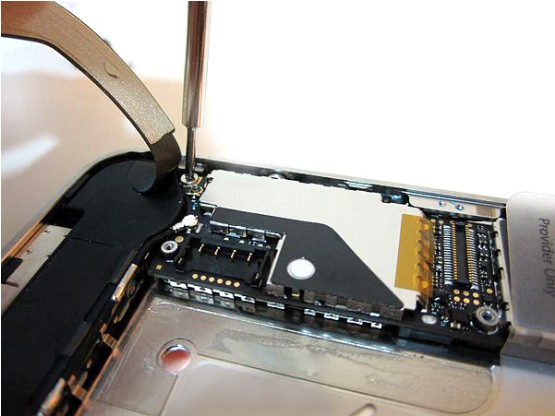
Remove the single 2.5 mm Phillips screw
connecting the battery connector to the logic board
Step 5
Use a plastic opening tool to pry the
battery connector up from its socket on the logic board Or use the clear
plastic pull-tab to gently lift the battery out of the iPhone
Remove the metal clip covering the antenna
connector
Be very careful when you do this, or you
may break the logic board entirely
Step 6
Remove two screws:One 1.2 mm Phillips;One
1.6 mm Phillips
And then remove the thin steel dock
connector cable cover from the iPhone
Use a opening tool to gently pry the dock
cable connector up off the logic board from both short ends of the connector
Remove the 1.9 mm Phillips screw securing
the bottom of the logic board to the inner case
Step 8
Remove five screws connecting the Wi-Fi
antenna to to the logic board:
One 2.3 mm Phillips
Two 1.6 mm Phillips
One 1.4 mm Phillips
One 4.8 mm Phillips
Use a opening tool to lift the top edge of
the Wi-Fi antenna away from the logic board
Use the tip of a tweezer to pull the Wi-Fi
retaining clips away from the inner frame
Remove the Wi-Fi antenna from the iPhone
Step 9
Use a opening tool to carefully lift the
rear camera connector up off its socket on the logic board
And remove the rear camera.
Step 10
Remove two screws connecting the vibrator
to to the logic board
Step 11
Carefully remove the logic board from the
iPhone
Step 12
Use the edge of a plastic opening tool to pry
the earpiece speaker off the adhesive securing it to the front panel
Follow these instructions in reverse order
while reassemble your device
Wednesday, 14 August 2013
Friday, 2 August 2013
Strongly Recomended Fashionable Spider Electroplate Plastic Hard Case for iPhone 5 Hot Pink on Black
Fashionable Spider Electroplate Plastic Hard Case for iPhone 5 Hot Pink on Black
Features
Unique and fashion spider design for iPhone 5
Full Protection for iPhone 5
Weakening the falling force on the phone when they are dropped suddenly.
Light weight, anti-sliding.
Easy install and remove and Washable
Easy access to controls and ports, so accessories can be connected with the case.
Various colors are available.
Details
N.W.:12g
G.W.:64g
Package: Crystal box package
Material: Plastic with electroplate
Compatiblity: for iPhone 5
Package Contect
1X Spider Hard Case for iPhone 5 Hot Pink on Black
Awesome Fashionable Spider Electroplate Plastic Hard Case for iPhone 5 Hot Pink & Gold
Directly beat your heat!Fashionable Spider Electroplate Plastic Hard Case for iPhone 5 Hot Pink on Gold: http://www.hytparts.com/000448-fashionable-spider-electroplate-plastic-hard-case-for-iphone-5-hot-pink-on-gold.html
Unique and fashion spider design for iPhone 5
Full Protection for iPhone 5
Weakening the falling force on the phone when they are dropped suddenly.
Light weight, anti-sliding.
Easy install and remove and Washable
Easy access to controls and ports, so accessories can be connected with the case.
Various colors are available.
Details
N.W.:12g
G.W.:64g
Package: Crystal box package
Material: Plastic with electroplate
Compatiblity: for iPhone 5
Package Contect
1X Spider Hard Case for iPhone 5 Hot Pink on Gold
Subscribe to:
Posts (Atom)